
1. Click on “Truck Master” in Data Dashboard and then by clicking on add truck master, you can add individual data or bulk data under respective tabs.
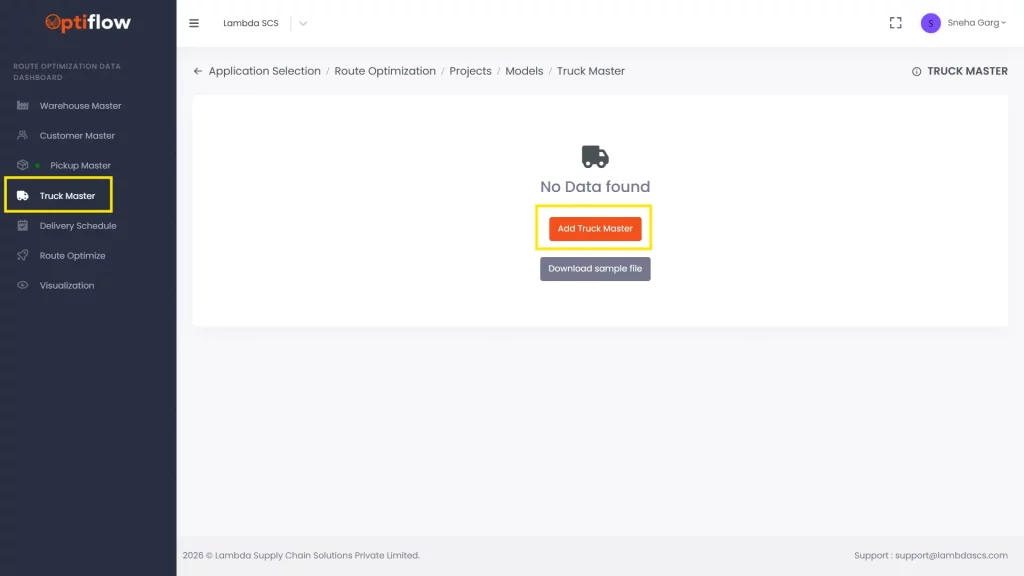
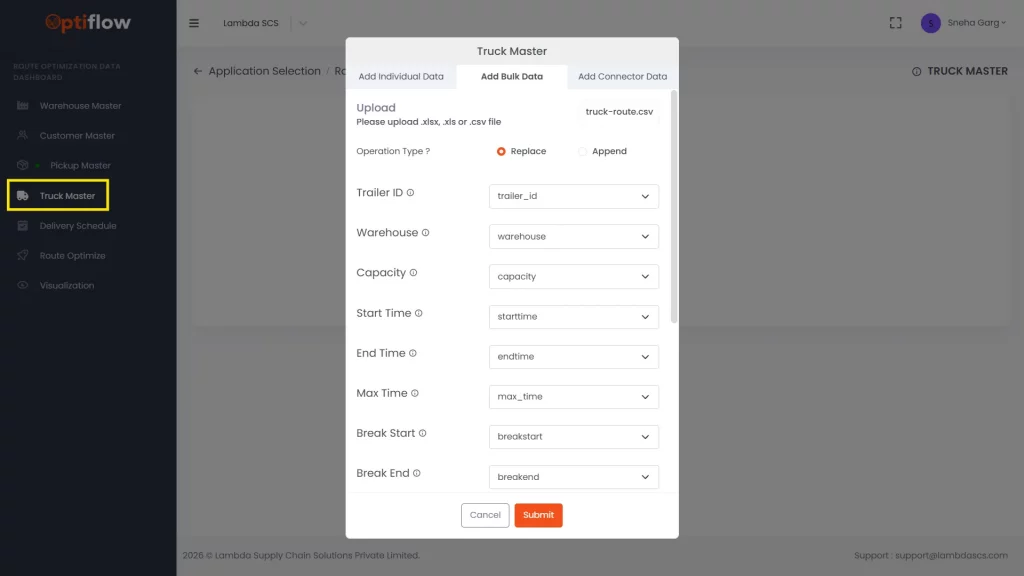
Table Description | |
Trailer ID | The ID of the delivery vehicle or truck to be added in this column. |
Warehouse | Starting or assigned warehouse for the vehicle to be added. |
Start time | Earliest time at which the truck can begin its journey to be added. |
End time | Maximum end time until which the truck can finish its journey to be added. |
Capacity | Capacity value of the truck to be added in this column. |
Break start | Break window start time (HH:MM) to be added in this column. |
Break end | Break window end time (HH:MM) to be added in this column. |
Cost per mile unit | Unit transportation cost by truck per mile to be added in this column. |
Max cost | Upper limit of the acceptable route cost for a truck to be added in this column. |
Max time | Maximum allowable daily travel time for a truck (in minutes) to be added in this column. |
Fixed cost | Fixed cost associated with the truck for a route to be added in this column. |
Break duration | Duration of the break allowed per day (in minutes) to be added in this column. |
Type | Type of truck (own or fleet) to be added in this column. |
Status | 1 or 0 can be assigned for active or inactive status of truck. |
Note | Any remarks/comments can be added in this column. |


